Model automation
You own the monthly three-statement update. Right now it eats half a day of copy-paste from the trial balance into a tired Excel model. Here's how to get to about ten minutes without giving up the model your CFO trusts.
1. The business decision
You're a first-year FP&A analyst at a mid-market manufacturer. On the second business day of every month, you update the three-statement model: income statement, balance sheet, cash flow. The CFO uses it on the third business day for the monthly business review.
Today, your process is: export the trial balance from NetSuite, open last month's workbook, paste the new numbers into the right rows, fix anything that broke, and reconcile until the balance sheet balances. It takes four to five hours and you've made sign-flip mistakes twice this quarter.
You don't need a new model. You need the same model, refreshed in about ten minutes, with a short note explaining what changed.
2. Data available
Three things are sitting in a folder on your laptop. Sample versions of all three are linked below so you can follow along:
- trial_balance.csv — April's data exported from NetSuite. About 100 rows, single period. Each new month you re-export it.
- account_mapping.csv — maps each GL account number to a line on the model (e.g. "Revenue", "COGS", "Accrued expenses") and a sign multiplier. You maintain this file by hand as the chart of accounts grows — and the workflow below is built around that fact.
- model_2026-03.xlsx
— last month's three-statement model. The "Inputs" tab
holds each period's numbers, one column per month, already laid
out for the full year. January through March are frozen
historicals from prior monthly updates; the April column is
empty, ready for the script to fill. The IS, BS, and CF tabs
reference Inputs, so populating April lights up the whole
model. Next month you'll start from
model_2026-04.xlsx— the previous run's output becomes the next run's input.
The real-world messiness is in the mapping file. A few accounts each month are new — a freshly opened legal entity, a pilot product line, a brand-new lease — so the mapping is always slightly behind. And sign convention is mixed: revenues are negative in the GL but positive in the model. The script handles the sign mechanically; you handle the new-account decisions, on purpose.
A sample of the trial balance:
account_number, account_name, period, debit, credit
40000, Product revenue - US, 2026-04, 0, 1898965.08
40010, Product revenue - EU, 2026-04, 0, 657396.84
50000, COGS - materials, 2026-04, 788756.23, 0
60100, Salaries - sales, 2026-04, 93709.12, 0
21000, Accrued expenses, 2026-04, 0, 152744.74
3. The build
Total session was about an hour, in six steps. The arc: plan, execute, evaluate, approve and re-run, ask for insight on the numbers, then turn the whole thing into a reusable monthly workflow — with a human checkpoint pinned over the one file that should never be edited silently.
Step 1 · Plan
I started with a plan request, not a code request. I gave it the role, the three files, and the exact steps I needed — including constraints that matter in practice:
You are a financial analyst. Every month you need to update
the three-statement model based on this month's trial balance
spreadsheet. You want to write Python code that automates the
paste-and-reconcile step. There are three relevant files in
the folder:
- trial_balance.csv
- account_mapping.csv
- model_2026-03.xlsx

The steps should be:
1) For each row in the TB file, categorize its model_line
   using the account_mapping. If no mapping exists, skip but
   record in a separate file.
2) For each row in the last column of the Input worksheet of
   model.xlsx, sum up the corresponding debit-credit for that
   model_line from the TB file. Fill the cell.
3) All existing files are read-only. Create new files if needed.
4) Save the updated model to a new file with month updated,
   do not overwrite source.
5) Leave all formula cells intact, do not change.

Before writing any code, first show me the complete plan.
The plan it returned was solid: each step laid out, the four
formula sheets it would leave alone called out by name, and the
sign convention it would apply —
(credit − debit) × sign, where
sign = −1 for debit-normal assets and
sign = +1 for everything else.
Step 2 · Execute
I approved the plan and told it to go ahead. It wrote about sixty lines of Python using pandas and openpyxl, then ran the script against the actual files. The first-pass output was exactly the diagnostic I wanted: 20 of 21 model lines filled, 5 unmapped accounts written to a CSV, balance sheet off by exactly $1,240. The script itself ran in about a second — the informative part is what it couldn't categorize on its own.
Step 3 · Evaluate
Before letting anything touch the mapping file, I asked for a recommendation table:
Give me a table of the unmapped accounts, and what
model_line I should add them to in the map and why.
This is the heart of the workflow. The script can suggest, but it doesn't get to silently edit the mapping file — that file is part of the audit trail for the model. The table it came back with looked like this:

Four of these were obvious sub-accounts. The fifth — "Other income" routed to Interest income — was a judgement call I needed to make, not a default the agent should make for me. The recommendation was reasonable; I accepted it for this month and noted to revisit if "Other income" grows.
Step 4 · Approval and re-run
I accepted the recommendations and told it to apply them:
Looks good, add them to account_mapping.csv as
suggested. Then re-run the script with the updated mapping.
Step 5 · Summary and insights
With the model balancing cleanly, I asked for the table that goes into the CFO note — with possible reasons, not just numbers:
Now generate a summary table that lists:
1. Revenue (value for this month, percentage change from
   last month, possible reasons)
2. Net income (value for this month, percentage change from
   last month, possible reasons)
3. Balance sheet (whether it is balanced)
4. The new accounts that were added to the map
The table it generated looked like this:
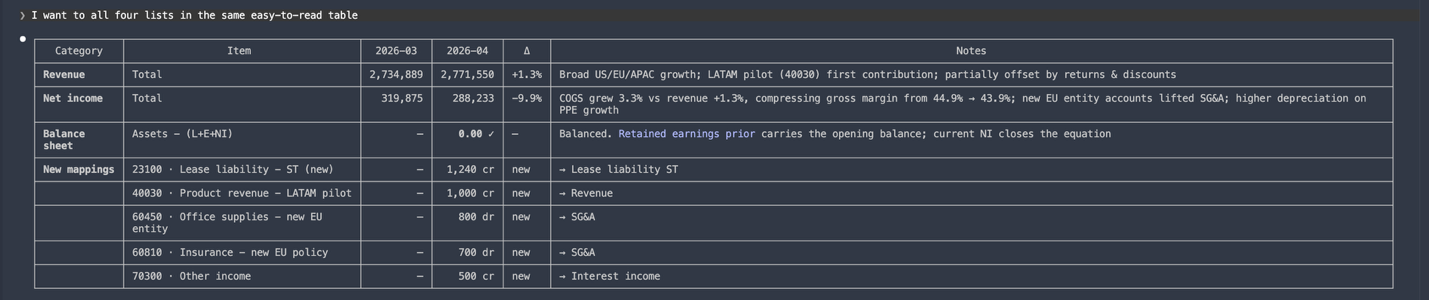
The "possible reasons" clause is what turns this from a
reconciliation report into something the CFO can actually read.
I ask to save this table as
summary_2026-04.xlsx
for future reference.
Step 6 · Automate, then pin the checkpoint
The whole point of doing this once was so I wouldn't have to do it as a fresh prompt sequence every month. So I asked:
Can you summarize my workflow in this session so I
can do this again next month?
What came back was more than a summary — it was a fully
automated end-to-end workflow: drop in the new TB, the script
detects unmapped accounts, proposes mappings, writes them to
account_mapping.csv, re-runs, and produces the
summary file. Hands-off. That's exactly the step I didn't want
automated. So one more prompt:
I need to check and approve the unmapped accounts
before adding them to the map. Make this a human
checkpoint.
It updated the workflow so any proposed change to
account_mapping.csv stops and prints the suggested
rows for me to approve before writing — a literal "type
'approve' to continue" gate. The script keeps the autonomy to
read, summarize, and recommend; it loses the autonomy to edit
the one file that defines how the business reports itself.
The final workflow document I saved for next month:
workflow.md.
4. What good looks like
The deliverable isn't the script — it's the model file
plus a three-line note to the CFO. The raw
summary_2026-04.xlsx
the script produces is the starting point, not the finished
product: condense it with human judgment — drop the rows
your CFO doesn't need (the new-mappings list belongs in your
records, not in the note), trim each comment to one crisp line,
and let the numbers do the talking. The note is the part most
analysts skip, and it's the part that builds trust:
| Category | 2026-03 | 2026-04 | Δ | Notes |
|---|---|---|---|---|
| Revenue | 2,734,889 | 2,771,550 | +1.3% | Broad growth across regions; LATAM pilot launched. |
| Net income | 319,075 | 288,233 | −9.9% | Gross margin compressed 44.9% → 43.9%; new EU entity lifted SG&A. |
| Balance sheet | — | Balanced ✓ | — | Five new accounts added to mapping this month. |
Once you trust the script, the ten minutes is: drop the new TB in the folder, run the script, review the unmapped table, approve, re-run, eyeball the three checks, write the note, send.
Watch for
- Letting the agent silently edit the mapping file. The mapping is your audit trail. Anything that changes it should pause and ask. Step 6's human checkpoint exists for this reason — do not skip it.
- Skipping the human note. A script that produces a balanced model with no commentary is less useful than a half-day spreadsheet with a sentence of insight. Don't lose the last mile.
5. How to do this again next month
The payoff of having written workflow.md in Step
6 is that next month is one prompt, not seven. When May's data
landed, I exported the trial balance, dropped it into the folder
over the old trial_balance.csv, and wrote:
I have updated new trial_balance data for May,
repeat what I did last month following this workflow
@workflow.md
The agent picked up the workflow, ran the script, paused at
the unmapped-accounts checkpoint (none this month), generated
the summary, and handed me back model_2026-05.xlsx
and summary_2026-05.xlsx. My job was the same as
last month's last mile: condense the table, write the CFO note,
send.
6. Extensions
Once the basic update is reliable, ask the agent to:
- Add a variance-vs-budget column and flag any line item more than 5% off plan.
- Wrap the script as a scheduled task that runs on the first business day, emails you the unmapped-accounts table, and pauses until you reply with approvals before producing the final model. The pause — not the schedule — is the interesting part.
The scheduled-task version maps to Module 6's section on hooks and recurring jobs; the human-checkpoint design is the same principle from Module 4's section on specifying the task.